
RedotPay कार्ड को Apple Pay और App Store से कैसे जोड़ें
RedotPay Visa card को Apple Pay में add करने और supported होने पर App Store payment method के रूप में use करने की step-by-step guide.
सारांश
Checked 2026-07-20
अगर आपका card, Apple ID region और device supported हैं, तो आप RedotPay Visa card को Apple Wallet में add करने की कोशिश कर सकते हैं.
RedotPay card सिर्फ normal online checkout के लिए नहीं है. अगर आपका card और region supported हैं, तो आप RedotPay Visa card को Apple Pay में add करके contactless payments, online Apple Pay checkout और App Store billing के लिए use कर सकते हैं.
यह guide RedotPay के raw Apple Pay और App Store setup material पर based है, लेकिन इसे practical Hindi tutorial के रूप में rewrite किया गया है. Apple Pay और App Store billing rules country, device, Apple ID status और card configuration के हिसाब से बदल सकते हैं. इसलिए नीचे दिए steps को setup path समझें, guarantee नहीं.
शुरू करने से पहले
पहले ये चीजें ready रखें:
- Apple Wallet वाला iPhone.
- Active RedotPay Visa card.
- Verification के लिए RedotPay app access.
- Test authorization या first purchase के लिए enough balance.
- ऐसा Apple ID जिसमें unresolved payment issue न हो.
अगर आप नया RedotPay account बना रहे हैं, तो Apple Pay try करने से पहले registration, KYC, card activation और funding complete करें.
RedotPay account बनाएं यह link use करें या app में referral code 3wiyh डालेंPart 1: Apple ID region check या change करें
कुछ RedotPay Apple Pay और App Store setup flows Singapore को Apple ID region के रूप में use करते हैं. Apple ID country या region तभी बदलें जब यह आपके account के लिए सही हो. Apple आपको remaining store credit use करने, subscriptions cancel करने या valid billing details देने के लिए कह सकता है.
iPhone पर region review या change करने के steps:
- iPhone में Settings खोलें.
- ऊपर अपने name पर tap करें.
- Media & Purchases में जाएं.
- View Account पर tap करें और Face ID, Touch ID या password से verify करें.
- Country/Region पर tap करें.
- अगर आपके setup के लिए सही है, तो Singapore select करें.
- Terms and conditions accept करें.
- अगर payment method पूछा जाए, तो available होने पर None select करें.
Region change fail होने पर active subscriptions, pre-orders, pending payments या Apple Account balance check करें.
Part 2: RedotPay card को Apple Pay में add करें
Card active होने के बाद Apple Wallet से add करें:
- iPhone पर Wallet app खोलें.
- ऊपर दाईं तरफ + button tap करें.
- Debit or Credit Card select करें.
- Card scan करें या RedotPay Visa card number manually enter करें.
- Cardholder name, expiry date और CVV security code भरें.
- SMS या RedotPay app के अंदर verification complete करें.
- Apple Wallet confirmation का wait करें.
Successful setup के बाद किसी important purchase से पहले छोटी supported transaction से test करें.
Part 3: App Store payment method में RedotPay card add करें
आप RedotPay card को Apple ID payment method के रूप में भी try कर सकते हैं:
- App Store खोलें.
- ऊपर दाईं तरफ profile picture tap करें.
- अपना Apple ID या account name tap करें.
- Payment & Shipping में जाएं.
- Add Payment Method tap करें.
- Visa select करें.
- RedotPay card number, expiry date और CVV enter करें.
- Apple मांगे तो billing information add करें.
- Save करने के लिए Done tap करें.
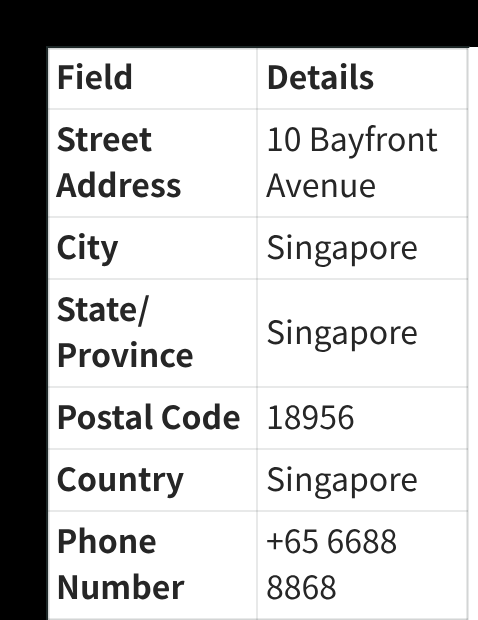
Billing information के लिए वही details use करें जो आपके account के लिए valid हों और Apple accept करे. Raw setup material में Singapore billing-address example है, लेकिन Apple ऐसी billing details reject कर सकता है जो आपके account, card या region से match न करें.
Link करने के बाद क्या कर सकते हैं
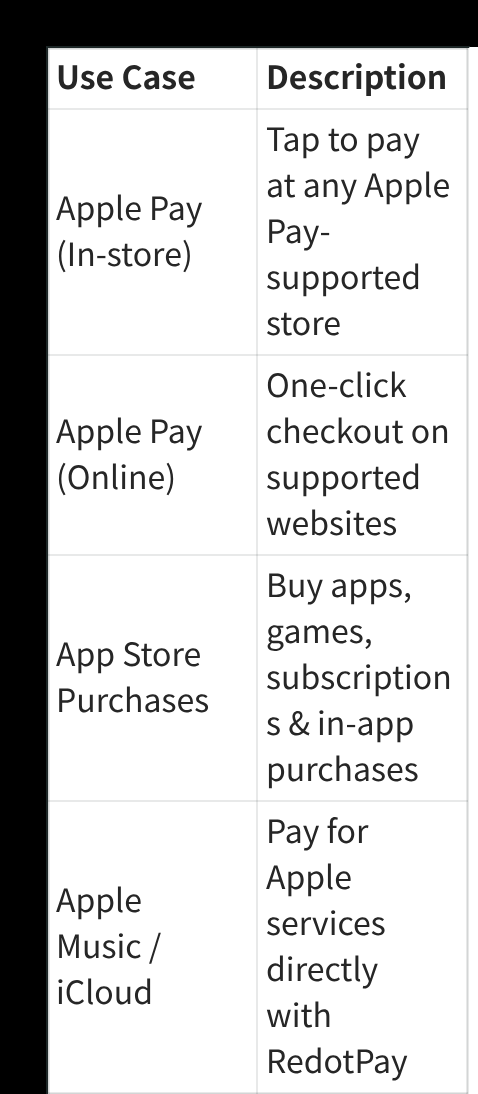
अगर card accept हो जाता है, तो common use cases:
| Use case | किस काम आएगा |
|---|---|
| Apple Pay in stores | Apple Pay-supported stores पर tap to pay. |
| Apple Pay online | Supported websites और apps पर Apple Pay checkout. |
| App Store purchases | Apps, games, subscriptions और in-app purchases. |
| Apple services | Apple Music या iCloud जैसे eligible services का payment. |
Availability Apple, merchant, device, card status और region support पर depend करती है.
Troubleshooting
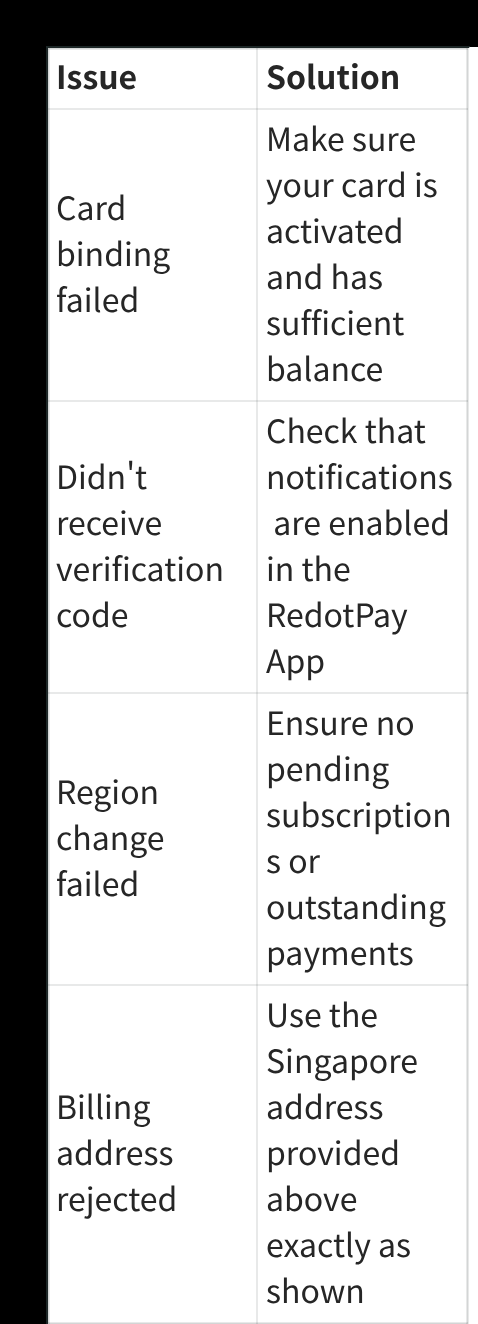
| Issue | क्या check करें |
|---|---|
| Card binding failed | Confirm करें कि card active है और balance enough है. |
| Verification code नहीं आया | RedotPay app notifications enable करें और SMS delivery check करें. |
| Region change failed | Active subscriptions, pending payments या Apple Account balance check करें. |
| Billing address rejected | Apple ID, card और region के लिए valid billing details use करें. |
| Apple Pay still does not work | बाद में फिर try करें, iOS update करें या RedotPay support contact करें. |
Practical notes
Apple Pay approval इस website के control में नहीं है. Card add न हो तो reason Apple-side eligibility, card restriction, temporary verification problem या region mismatch हो सकता है.
RedotPay card में enough balance रखें, exchange rates और fees देखें, और time-sensitive purchase से ठीक पहले Apple ID settings change न करें. छोटी test transaction सबसे शांत तरीका है.
RedotPay account बनाएं यह link use करें या app में referral code 3wiyh डालेंSources and verification
- How to use a RedotPay card with Apple Pay — Official RedotPay, checked 2026-07-20
अक्सर पूछे जाने वाले सवाल
क्या RedotPay card Apple Pay में add हो सकता है?
क्या Apple ID region बदलना जरूरी है?
Apple Pay verification fail क्यों होती है?
इस विषय में Payments और subscriptions
संबंधित guides
- RedotPay कार्ड को Google Pay और Google Play से कैसे जोड़ें Supported होने पर RedotPay Visa card को Google Wallet और Google Play payments में add करने की step-by-step guide.
- RedotPay कार्ड को Alipay से कैसे जोड़ें Supported होने पर RedotPay Visa card को Alipay में add करने और verification complete करने की step-by-step guide.
- RedotPay कार्ड को WeChat Pay से कैसे जोड़ें Supported होने पर RedotPay Visa card को WeChat Pay Wallet में add करने की step-by-step guide.
- $5 sign-up reward कैसे use करें RedotPay $5 sign-up reward कैसे काम करता है, इससे क्या pay नहीं होता, validity कितनी है और इसे कब use करना है.
- कौन से RedotPay प्रोमो कोड इस्तेमाल करें? — PAY8U, COUPO, 3wiyh पहले PAY8U: वर्चुअल $10 → $8। पहले COUPO: पात्र फिजिकल $100 → $80। दोनों पर 20% छूट; भुगतान से पहले जाँचें। 3wiyh केवल पंजीकरण के लिए।
RedotPay support in India
Checked 2026-10-15- Account & KYC
- Conditional — check in app
- Virtual card
- Restricted
- App access
- Available
India is absent from the current registration and location-access restriction lists, but it is explicitly listed in RedotPay's card-issuance restrictions. Residents cannot currently obtain a virtual or physical card or use an India billing address. Do not fund an issuance order; recheck the official list for a status change.
RedotPay officially restricts this country. Do not register until the official status changes.