
RedotPay کارڈ کو Apple Pay اور App Store سے کیسے جوڑیں
RedotPay Visa card کو Apple Pay میں add کرنے اور supported ہونے پر App Store payment method کے طور پر استعمال کرنے کی step-by-step guide.
خلاصہ
Checked 2026-07-20
اگر آپ کا card، Apple ID region اور device supported ہوں تو آپ RedotPay Visa card کو Apple Wallet میں add کرنے کی کوشش کر سکتے ہیں۔
RedotPay card صرف عام online checkout کے لیے نہیں ہے۔ اگر آپ کا card اور region supported ہیں تو آپ RedotPay Visa card کو Apple Pay میں add کر کے contactless payments، online Apple Pay checkout اور App Store billing کے لیے استعمال کر سکتے ہیں۔
یہ guide RedotPay کے raw Apple Pay اور App Store setup material پر based ہے، مگر اسے practical اردو tutorial کے طور پر rewrite کیا گیا ہے۔ Apple Pay اور App Store billing rules country، device، Apple ID status اور card configuration کے حساب سے بدل سکتے ہیں۔ اس لیے نیچے دیے گئے steps کو setup path سمجھیں، guarantee نہیں۔
شروع کرنے سے پہلے
یہ چیزیں ready رکھیں:
- Apple Wallet والا iPhone.
- Active RedotPay Visa card.
- Verification کے لیے RedotPay app access.
- Test authorization یا first purchase کے لیے enough balance.
- ایسا Apple ID جس میں unresolved payment issue نہ ہو.
اگر آپ نیا RedotPay account بنا رہے ہیں تو Apple Pay try کرنے سے پہلے registration، KYC، card activation اور funding complete کریں۔
RedotPay account بنائیں یہ link استعمال کریں یا app میں referral code 3wiyh درج کریںPart 1: Apple ID region check یا change کریں
کچھ RedotPay Apple Pay اور App Store setup flows Singapore کو Apple ID region کے طور پر use کرتے ہیں۔ Apple ID country یا region صرف تب بدلیں جب یہ آپ کے account کے لیے درست ہو۔ Apple آپ سے remaining store credit use کرنے، subscriptions ختم کرنے یا valid billing details دینے کا کہہ سکتا ہے۔
iPhone پر region review یا change کرنے کے steps:
- iPhone میں Settings کھولیں۔
- اوپر اپنے name پر tap کریں۔
- Media & Purchases میں جائیں۔
- View Account پر tap کریں اور Face ID، Touch ID یا password سے verify کریں۔
- Country/Region پر tap کریں۔
- اگر آپ کے setup کے لیے صحیح ہے تو Singapore select کریں۔
- Terms and conditions accept کریں۔
- اگر payment method پوچھا جائے تو available ہونے پر None select کریں۔
Region change fail ہونے پر active subscriptions، pre-orders، pending payments یا Apple Account balance check کریں۔
Part 2: RedotPay card کو Apple Pay میں add کریں
Card active ہونے کے بعد Apple Wallet سے add کریں:
- iPhone پر Wallet app کھولیں۔
- اوپر دائیں طرف + button tap کریں۔
- Debit or Credit Card select کریں۔
- Card scan کریں یا RedotPay Visa card number manually enter کریں۔
- Cardholder name، expiry date اور CVV security code بھریں۔
- SMS یا RedotPay app کے اندر verification complete کریں۔
- Apple Wallet confirmation کا wait کریں۔
Successful setup کے بعد کسی important purchase سے پہلے چھوٹی supported transaction سے test کریں۔
Part 3: App Store payment method میں RedotPay card add کریں
آپ RedotPay card کو Apple ID payment method کے طور پر بھی try کر سکتے ہیں:
- App Store کھولیں۔
- اوپر دائیں طرف profile picture tap کریں۔
- اپنا Apple ID یا account name tap کریں۔
- Payment & Shipping میں جائیں۔
- Add Payment Method tap کریں۔
- Visa select کریں۔
- RedotPay card number، expiry date اور CVV enter کریں۔
- Apple مانگے تو billing information add کریں۔
- Save کرنے کے لیے Done tap کریں۔
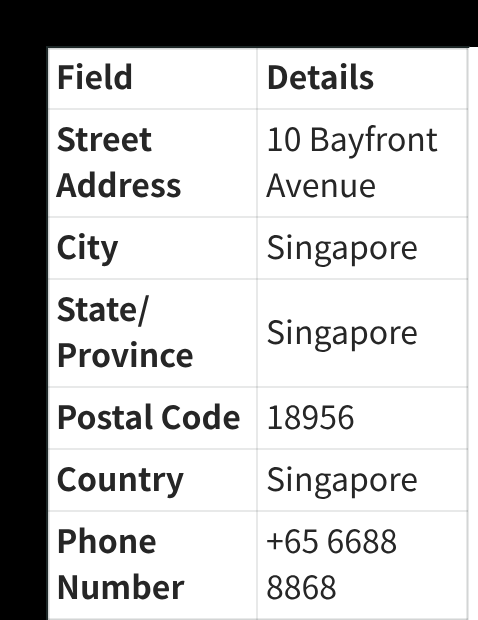
Billing information کے لیے وہ details use کریں جو آپ کے account کے لیے valid ہوں اور Apple accept کرے۔ Raw setup material میں Singapore billing-address example ہے، مگر Apple ایسی billing details reject کر سکتا ہے جو account، card یا region سے match نہ کریں۔
Link کرنے کے بعد کیا کر سکتے ہیں
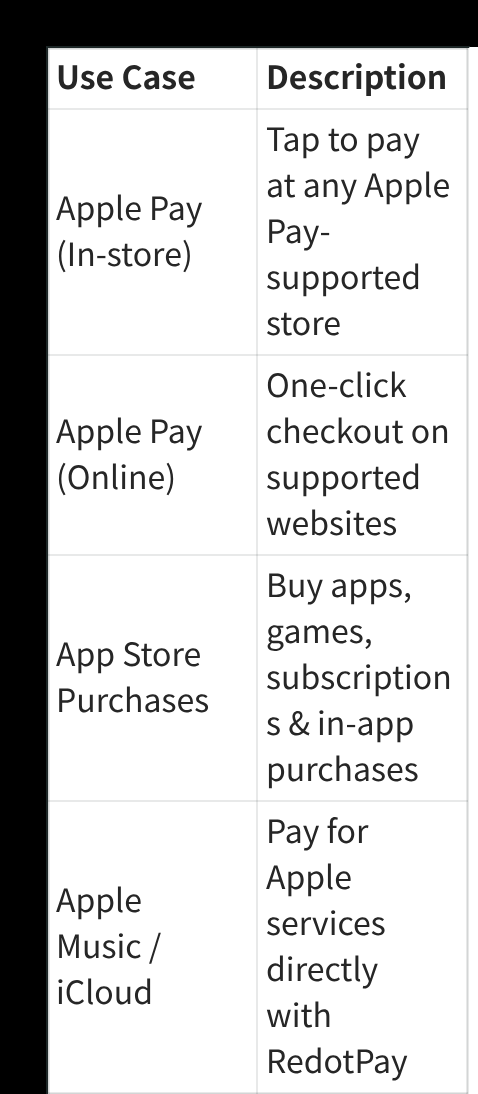
اگر card accept ہو جائے تو common use cases:
| Use case | کس کام آئے گا |
|---|---|
| Apple Pay in stores | Apple Pay-supported stores پر tap to pay. |
| Apple Pay online | Supported websites اور apps پر Apple Pay checkout. |
| App Store purchases | Apps، games، subscriptions اور in-app purchases. |
| Apple services | Apple Music یا iCloud جیسی eligible services کا payment. |
Availability Apple، merchant، device، card status اور region support پر depend کرتی ہے۔
Troubleshooting
| Issue | کیا check کریں |
|---|---|
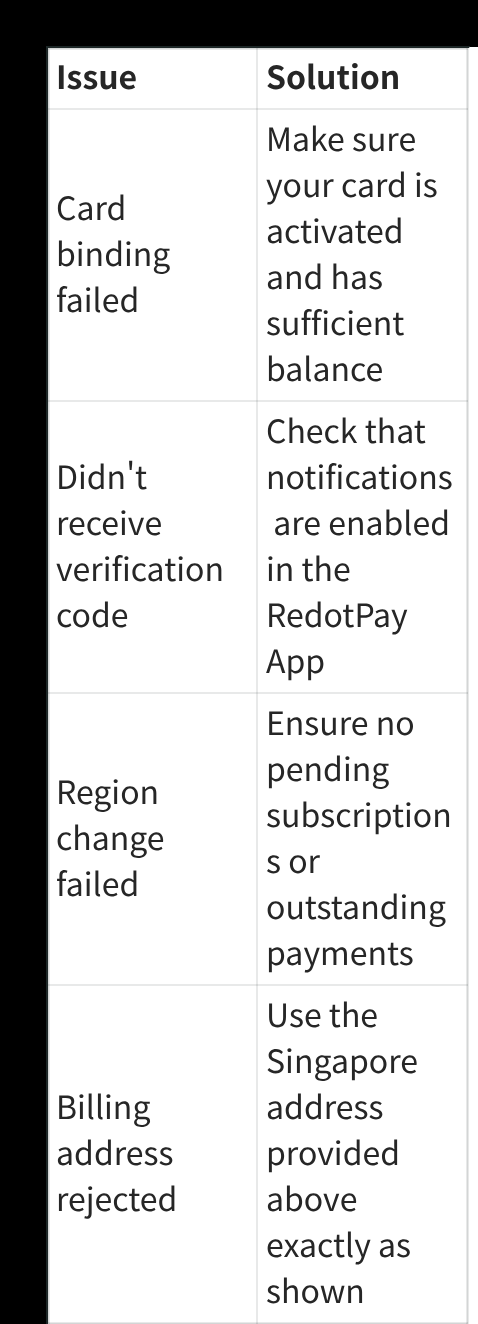
| Card binding failed | Confirm کریں کہ card active ہے اور balance enough ہے۔ |
| Verification code نہیں آیا | RedotPay app notifications enable کریں اور SMS delivery check کریں۔ |
| Region change failed | Active subscriptions، pending payments یا Apple Account balance check کریں۔ |
| Billing address rejected | Apple ID، card اور region کے لیے valid billing details use کریں۔ |
| Apple Pay still does not work | بعد میں پھر try کریں، iOS update کریں یا RedotPay support contact کریں۔ |
Practical notes
Apple Pay approval اس website کے control میں نہیں ہے۔ Card add نہ ہو تو reason Apple-side eligibility، card restriction، temporary verification problem یا region mismatch ہو سکتا ہے۔
RedotPay card میں enough balance رکھیں، exchange rates اور fees دیکھیں، اور time-sensitive purchase سے فوراً پہلے Apple ID settings change نہ کریں۔ چھوٹی test transaction سب سے آسان confirmation ہے۔
RedotPay account بنائیں یہ link استعمال کریں یا app میں referral code 3wiyh درج کریںSources and verification
- How to use a RedotPay card with Apple Pay — Official RedotPay, checked 2026-07-20
اکثر پوچھے گئے سوالات
کیا RedotPay card Apple Pay میں add ہو سکتا ہے؟
کیا Apple ID region بدلنا ضروری ہے؟
Apple Pay verification کیوں fail ہوتی ہے؟
اس موضوع میں Payments اور subscriptions
متعلقہ گائیڈز
- RedotPay کارڈ کو Google Pay اور Google Play سے لنک کریں Supported ہونے پر RedotPay Visa card کو Google Wallet اور Google Play payments میں add کرنے کی step-by-step guide.
- RedotPay کارڈ کو Alipay سے لنک کریں Supported ہونے پر RedotPay Visa card کو Alipay میں add کرنے اور verification complete کرنے کی step-by-step guide.
- RedotPay کارڈ کو WeChat Pay سے لنک کریں Supported ہونے پر RedotPay Visa card کو WeChat Pay Wallet میں add کرنے کی step-by-step guide.
- Pakistan میں RedotPay سے ChatGPT اور Gemini Payment؟ Pakistan میں ChatGPT و Google AI availability، RedotPay acceptance uncertainty، billing، authorization، safe test اور fallback دیکھیں۔
- Pakistan میں RedotPay Virtual Card: Price اور Setup 2026 Pakistan RedotPay virtual-card eligibility، PVARA authorization، $10 price، PAY8U checkout rule، KYC اور billing address دیکھیں۔
RedotPay support in Pakistan
Checked 2026-09-14- Account & KYC
- Conditional — check in app
- Virtual card
- Conditional — check in app
- App access
- Available
Current RedotPay restriction lists leave a conditional registration and virtual-card route. Pakistan requires PVARA approval for virtual-asset service providers; verify RedotPay's current authorization before funding.
Recommended path: register, complete KYC, and check virtual-card eligibility in the app.
RedotPay sign-up reward اور virtual-card discount حاصل کریں
دونوں offers الگ مراحل میں استعمال ہوتے ہیں۔ Sign-up reward سے card application fee ادا نہیں ہوتی۔
Invite-link reward
Eligible ہونے پر ہمارے invite link سے register کر کے $5 reward حاصل کریں۔
Virtual-card promo code
$10 virtual-card application کے وقت PAY8U درج کریں اور supported ہونے پر $2 بچا کر $8 ادا کریں۔
PAY8U
Alternative virtual-card code: OFF20 / RED08